Getting Google Nest Cameras Into Frigate NVR
The full story of getting Nest cameras streaming into Frigate with Hailo-8L AI detection — including the bugs Google won't tell you about.
Listen while you read
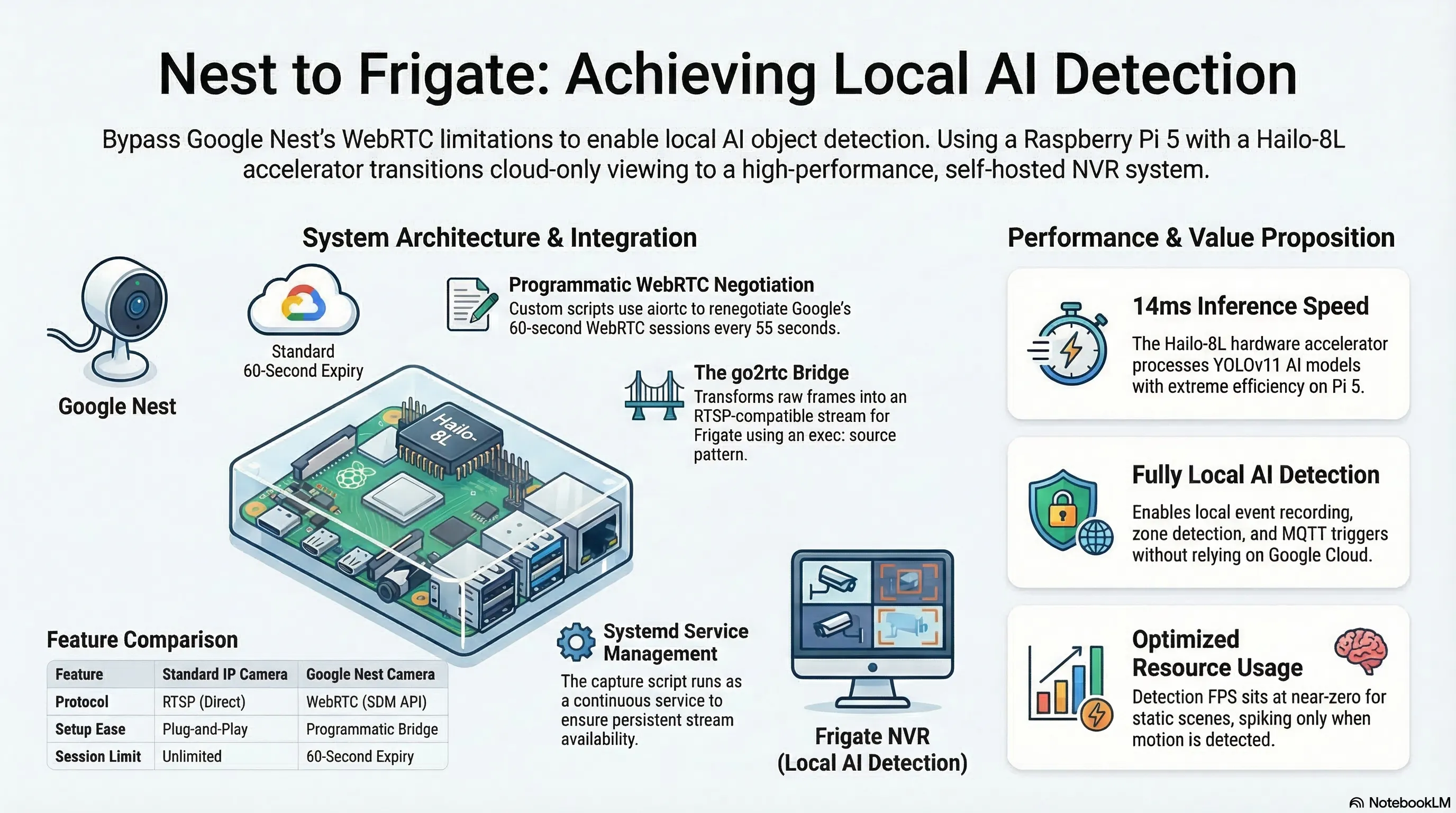
I’ve tried this at least three times before. Each time I hit a wall, gave up, and went back to watching my Nest cameras through the Google Home app like a normal person. This time I finally cracked it — and the solution turned out to be genuinely weird in ways I want to document properly, because the information online is either outdated, incomplete, or glosses over the exact failure modes that will destroy your afternoon.
This is the full story of how I got two Google Nest cameras streaming live into Frigate NVR with Hailo-8L AI object detection on a Raspberry Pi 5.
Why do this?
Frigate is a self-hosted NVR that does real-time AI object detection on your camera streams. Everything runs locally, you get proper event recording, zone detection, MQTT integration and Home Assistant automations. My Pi 5 has a Hailo-8L AI accelerator running YOLOv11 inference at around 14ms per frame. I already had a Pi camera and a robot camera streaming into Frigate without issue. The Nest cameras were the holdout.
Why Nest cameras are difficult
Most IP cameras speak RTSP. You point Frigate at rtsp://192.168.1.x:554/stream and you’re done in five minutes.
Google Nest cameras do not speak RTSP. Google deprecated the old Works with Nest API in 2019 and replaced it with the Smart Device Management (SDM) API, which is WebRTC-only. WebRTC is a browser technology built for peer-to-peer video calls — not for pulling a continuous stream into a local NVR.
The camera_proxy dead end
The most commonly suggested approach is using Home Assistant’s Nest integration, which exposes cameras as HA entities, then fetching snapshots from HA’s camera_proxy endpoint:
curl "http://homeassistant.local:8123/api/camera_proxy/camera.front_garden_camera?token=..."This looks great on paper. In practice, it silently returns a placeholder.
Google Nest cameras only stream when there’s an active WebRTC session. When HA starts up and nobody has opened the camera dashboard, there’s no active session, so camera_proxy returns a 640×480 grayscale placeholder — 2,689 bytes, identical for every Nest camera you have.
You can check whether you’re getting the placeholder:
curl -s -o /tmp/frame.png \
  "http://192.168.1.200:8123/api/camera_proxy/camera.front_garden_camera?token=YOUR_TOKEN"
ls -lh /tmp/frame.png   # Real frame: 100KB+. Placeholder: 2.6KB.
md5sum /tmp/frame.png   # 86a16300a89c834fc52187380d80c6da = placeholder
The workaround is to open the camera in your browser, which triggers a WebRTC session and makes camera_proxy return real frames — but only while the tab is open. Google enforces a 60-second maximum session lifetime. This isn’t a solution.
The right approach: programmatic WebRTC
The actual solution is to negotiate the WebRTC session yourself, programmatically, and keep it alive continuously.
Home Assistant’s WebSocket API has a camera/webrtc/offer message type. You send an SDP offer, HA forwards it to Google’s SDM API, Google returns an SDP answer with ICE candidates, and you end up with a live H264 stream you can decode.
I used aiortc:
pip3 install --break-system-packages aiortcBug 1: Google’s SDP offer requirements
Google is strict about the SDP offer format. It must contain exactly three media sections (“m-lines”) in this exact order:
- audio (recvonly)
- video (recvonly)
- application (a WebRTC data channel)
Get this wrong and Google returns "Offer must contain each of audio, video and application m lines in that order".
The offer must also include H264/90000 as a supported video codec, or Google returns "Offer must contain H264/90000 as a supported codec".
In aiortc, the correct setup is:
pc = RTCPeerConnection()
pc.addTransceiver("audio", direction="recvonly")
pc.addTransceiver("video", direction="recvonly")
pc.createDataChannel("dataSendChannel")  # adds the application m-line
Order matters — audio first, then video, then the data channel.
Bug 2: Google’s empty ICE candidate foundation
After getting a real SDP answer back (with genuine ICE candidates from Google’s servers at 74.125.247.x), my script crashed the moment I called setRemoteDescription:
ValueError: invalid literal for int() with base 10: 'udp'This is a non-obvious bug. The RFC 5245 SDP candidate format is:
a=candidate:foundation component protocol priority ip port typ type [...]Google’s SDM API returns candidates with an empty foundation field — a space immediately after the colon:
a=candidate: 1 udp 2113939711 74.125.247.235 19305 typ host generation 0aiortc’s parser calls value.split() and tries int(bits[1]) expecting the component — but with no foundation, bits[0] is "1" (the component) and bits[1] is "udp" (the protocol). Hence int("udp") fails.
The fix is to patch the SDP answer before handing it to aiortc:
def fix_google_sdp(sdp: str) -> str:
    """Google's SDM SDP has an empty foundation in a=candidate lines.
    Insert a dummy foundation so aiortc's parser can handle it."""
    lines = []
    for line in sdp.splitlines():
        if line.startswith("a=candidate: "):  # space after colon = empty foundation
            line = "a=candidate:0 " + line[len("a=candidate: "):]
        lines.append(line)
    return "\r\n".join(lines)

# Apply before setRemoteDescription:
await pc.setRemoteDescription(
    RTCSessionDescription(sdp=fix_google_sdp(sdp_answer), type="answer")
)
Bug 3: lstrip is not removeprefix
While I’m on the subject of subtle Python bugs: if you’re parsing ICE candidate strings yourself, don’t use lstrip to strip a prefix.
# WRONG — lstrip strips individual characters, not a literal string
candidate_str = candidate_str.lstrip("a=candidate:")
lstrip("a=candidate:") strips any leading character that appears in the set {a, =, c, n, d, i, t, e, :}. If the candidate foundation starts with any of those characters (like e or d), they get silently eaten. Use explicit slicing:
if line.startswith("a="):
    line = line[2:]
if line.startswith("candidate:"):
    line = line[len("candidate:"):]
Bug 4: concurrent readers on one WebSocket
To handle two cameras, my first attempt ran two coroutines that both read from the same WebSocket connection:
# This crashes:
tasks = [capture_camera(ws, cam1), capture_camera(ws, cam2)]
await asyncio.gather(*tasks)
# Error: cannot call recv while another coroutine is already waiting
A WebSocket connection has a single receive buffer. Two coroutines can’t wait on it simultaneously. The fix is a dispatcher pattern — one task reads all messages and routes them to per-camera queues by message ID:
inboxes = {10: asyncio.Queue(), 11: asyncio.Queue()}

async def dispatcher():
    async for raw in ws:
        msg = json.loads(raw)
        mid = msg.get("id")
        if mid in inboxes:
            await inboxes[mid].put(msg)

asyncio.create_task(dispatcher())

# Each camera reads from its own queue
async def capture_camera(inbox: asyncio.Queue, ...):
    msg = await asyncio.wait_for(inbox.get(), timeout=15.0)
    ...
The go2rtc bridge
Once frames hit disk as PNGs, they need to become an RTSP stream that Frigate can read. go2rtc (embedded in Frigate) has an exec: source type that runs a shell command and reads its stdout.
#!/bin/bash
FRAME="/media/frigate/frames/driveway_frame.png"
until [ -f "$FRAME" ]; do sleep 0.2; done

exec ffmpeg -loglevel warning \
    -re -f image2 -loop 1 -r 2 \
    -i "$FRAME" \
    -c:v libx264 -preset ultrafast -tune zerolatency \
    -pix_fmt yuv420p -g 10 \
    -f mpegts pipe:1
Two things are essential here:
-re is not optional. Without it, ffmpeg encodes a static PNG as fast as possible — around 75fps on a Pi 5. go2rtc then tries to serve a 75fps RTSP stream. Add -re and ffmpeg throttles to real-time, so with -r 2 you get a proper 2fps output.
MPEG-TS, not RTSP. RTSP is bidirectional (the server must respond to DESCRIBE/SETUP/PLAY requests), so it can’t work over a pipe. MPEG-TS is a one-directional byte stream that go2rtc reads directly from stdout and re-serves as RTSP.
The Frigate config:
go2rtc:
  streams:
    driveway_camera:
      - 'exec:/media/frigate/.scripts/stream-driveway_camera.sh'

cameras:
  driveway_camera:
    ffmpeg:
      hwaccel_args: []
      inputs:
        - path: rtsp://localhost:8554/driveway_camera
          input_args: -rtsp_transport tcp -fflags +genpts
          roles:
            - detect
            - record
    detect:
      enabled: true # required explicitly in Frigate v0.17
      width: 640
      height: 480
      fps: 2
Note enabled: true under detect. In Frigate v0.17, having detect in the input roles is not sufficient — you must set this explicitly or the Hailo detector never runs on that camera’s frames. You’ll see detection_enabled: false in the API stats if you miss it.
Also required in docker-compose:
environment:
  GO2RTC_ALLOW_ARBITRARY_EXEC: 'true'
Keeping the token out of the script
The HA long-lived access token should live in a .env file, not in the script:
# /home/pi/frigate-nvr/.env  (chmod 600, gitignored)
HA_WS_URL=ws://192.168.1.200:8123/api/websocket
HA_TOKEN=your-long-lived-token-here

# In the script
_load_env("/home/pi/frigate-nvr/.env")
HA_TOKEN = os.environ["HA_TOKEN"]  # KeyError if missing = deliberate
Running it as a service
The capture script runs continuously, renegotiating WebRTC sessions every 55 seconds (just before Google’s 60-second expiry). It’s managed by systemd:
# /etc/systemd/system/nest-webrtc-capture.service
[Unit]
Description=Nest WebRTC Frame Capture for Frigate
After=network.target

[Service]
Type=simple
Restart=always
RestartSec=5
ExecStart=/usr/bin/python3 /home/pi/frigate-nvr/nest-webrtc-capture.py
User=pi

[Install]
WantedBy=multi-user.target
sudo systemctl enable --now nest-webrtc-capture.serviceThe full architecture
Google Nest Cameras
        │
        ▼
HA WebSocket API  ──  camera/webrtc/offer
        │
        ▼
nest-webrtc-capture.py  [aiortc on host]
  · WebRTC session per camera, refreshed every 55s
  · H264 decoded → PNG saved atomically every 0.5s
        │
        ▼
/home/pi/frigate-nvr/storage/frames/
  driveway_frame.png   (~150–500KB)
  garden_frame.png     (~150–500KB)
        │
        ▼
go2rtc exec: script  [ffmpeg -re -loop 1 -r 2 → libx264 → mpegts → stdout]
        │
        ▼
go2rtc RTSP  →  rtsp://localhost:8554/driveway_camera
        │
        ▼
Frigate NVR  →  Hailo-8L (14ms inference)  →  detections, recordings, events
Result
driveway_camera:  2.0 fps  ·  detect active  ✓
garden_camera:    2.0 fps  ·  detect active  ✓
Hailo-8L:         14ms inference             ✓
Detection FPS sits near zero on a static scene — Frigate only runs the AI detector when the motion detector sees frame differences. When someone walks through, it spikes to the full 2fps camera rate, the object is tracked, an event is created, and a clip is saved.
The gotcha list
For skimmers:
camera_proxyreturns a 2.6KB placeholder when no WebRTC session is active. Don’t use it for Nest cameras.- Google’s SDP offer must have audio + video + application m-lines in that order, and include
H264/90000. - Google’s SDP answer has an empty ICE candidate foundation (
a=candidate: 1 udp ...). Patch it before passing to aiortc. lstrip≠removeprefix. Use explicit slicing to strip string prefixes.- Two cameras, one WebSocket — you need a dispatcher pattern with per-camera queues.
- ffmpeg without
-reloops a static PNG at ~75fps. Add-re. - go2rtc
exec:needs MPEG-TS output, not RTSP — pipes are unidirectional. - Frigate v0.17 requires
detect: enabled: trueexplicitly in each camera block. - Hailo version must match exactly between container
hailortcliand host firmware. - Google sessions expire at 60 seconds. Plan to renegotiate.
Pi 5 + Hailo-8L · Frigate v0.17 · aiortc 1.14.0 · go2rtc 1.9.10 · Home Assistant