Own Your Voice
Cloud TTS rents you a voice and keeps your data. Afterwords clones it once so you own it — running locally, in a menu-bar app, or via your own API.
Listen while you read
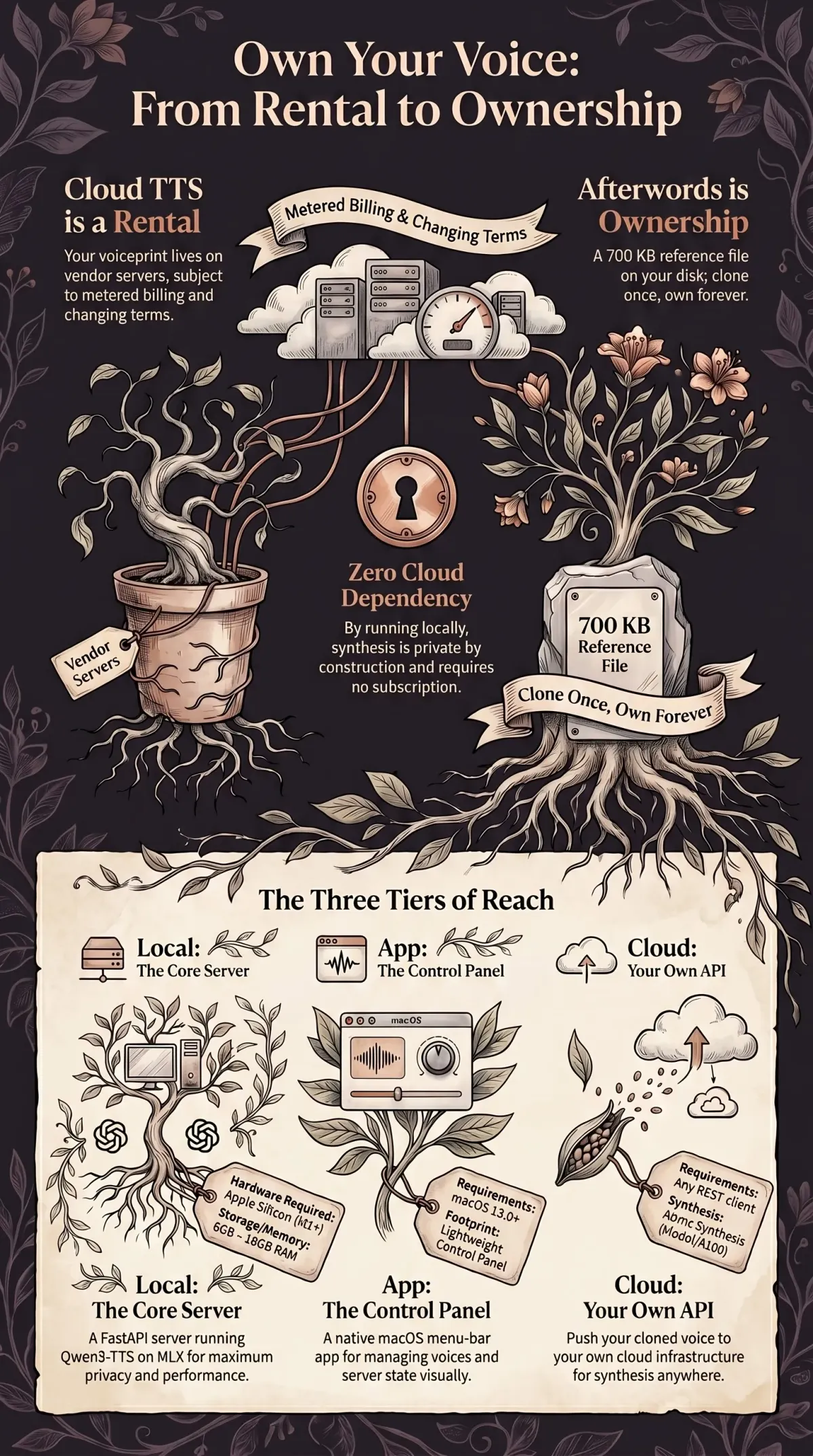
The big text-to-speech services will clone your voice in about thirty seconds. Upload a sample, and you can have your own voice — or anyone’s — reading text on demand. It is genuinely impressive technology.
It is also a rental. Your voiceprint lives on their servers. Your synthesis runs through their pipeline, on their terms, metered by their billing. The voice is “yours” the way a streaming library is yours: right up until the subscription lapses, the terms change, or the company decides your account is a problem. You don’t own the voice. You own access to it.
Afterwords started as the opposite of that, almost by accident, and over the last few months it grew into a deliberate one: clone a voice once, own it forever, and use it anywhere — without renting it back by the month.
Where it came from
This thread started with a robot. SPARK — a Raspberry Pi companion built for my kids — needed a voice, and not a generic one. So I built a voice-cloning pipeline on Qwen3-TTS and MLX that runs entirely on Apple Silicon: feed it a fifteen-second clip, get a usable cloned voice, no cloud round-trip.
The pipeline was already running on localhost. Claude Code was already running on the same machine. The only missing piece was a hook — so I wired Afterwords into Claude Code to hear every response spoken aloud. That was the whole project: a local TTS server and a stop hook. Private by construction, because nothing left the Mac.
What I didn’t expect was how much the “nothing leaves the Mac” part mattered. Once a voice is a 700 KB reference clip on your own disk instead of a row in someone’s database, the entire relationship to it changes. It’s a file. You can back it up, copy it, delete it, and no one else has a copy. That’s the idea the rest of this is built around.
Three tiers, one principle
Afterwords is now three pieces. The principle is the same in all of them — you hold the voice — but each tier trades a little ownership for a little reach.
Local — the server. The core is still a local voice-cloning TTS server: Qwen3-TTS (0.6B and 1.7B) running on MLX, cloning from a fifteen-second clip, serving any number of voices from a single model load. It now ships with 103 flagship voice families (284 profiles) and wires into the harnesses people actually live in — Claude Code, Codex CLI, Cursor, Gemini CLI / Antigravity, and Hermes. No cloud API, no subscription, no data leaving the machine. This is the tier with full ownership and zero dependencies.
App — the control panel. Running a server from the terminal is fine until you want to forget it’s there. The Afterwords menu-bar app (v1.2) is a native SwiftUI control panel: a status dot that tells you at a glance whether the server is up, start/stop/restart, a searchable voices window where a click plays a sample, a mute toggle, launch-at-login. It updates itself through Sparkle 2 with an EdDSA-signed appcast, so the app stays current without a store in the loop. It does not own the server — launchd does — it just makes the local server feel like a first-class Mac citizen. (It’s built in the same copper-on-dark palette as this site, which was not an accident.)
Cloud — your own API. The one thing pure-local can’t do is follow you off the Mac. So there’s Afterwords Cloud: clone your voice once on a Mac, push it up, and synthesize from anywhere over a REST API — no Apple Silicon required at call time. Architecturally it’s a Cloudflare Worker (Hono) holding API-key hashes in KV, voice and job metadata in D1, and reference audio in R2, handing synthesis to a Modal GPU job and writing the result back. Synthesis is always async: you get a 202 and poll, because honest latency beats a hung request. It’s built and running in early access rather than a public sign-up-today product — but the contract is the point. It’s your key, your voice, your cloud tier, behaving like infrastructure you rent by the call instead of a voice you rent by the month.
The part worth being careful about
A tool that clones a voice from a fifteen-second clip is the same tool whether the clip is yours, a friend’s who said yes, or someone’s who didn’t. “Own your voice” is the thesis precisely because the failure mode is owning someone else’s. The local-first design helps with the privacy half — your voiceprint isn’t sitting in a vendor’s training set — but it does nothing about consent. That part is on the person holding the clip. Clone voices you have the right to clone. The technology will not enforce that, and pretending otherwise is how this category earns its bad reputation.
Why this shape
I didn’t set out to build a product. I set out to give a robot a voice and ended up with a question I couldn’t put down: why does using your own voice mean uploading it to someone who keeps it? Afterwords is the answer I’m most comfortable with — local by default, portable when you need it, and yours at every tier. Clone once. Own forever. Use anywhere.
Afterwords is open source. See the project page for the local server, the macOS app, and Afterwords Cloud. It grew out of the PiCar-X build — The Robot That Refuses to Give Orders, Giving a Robot Three Voices, Voice Cloning with Qwen3-TTS and MLX, and Afterwords: Completing the Voice Loop in Claude Code.